Monthly Subscription Payment Example
(scroll down to see Annual subscription payment example)
You can set up your monthly subscription by using a credit card or your PayPal account (if you have one). Either way, you will receive an immediate payment confirmation email message plus an email from us with your new username and password to our subscriber's website.
PayPal, the world’s largest credit card transaction processing company (over 1 million per day!), is our credit card processor. All credit cards are accepted or you may use your PayPal Account (if you have one).
Your monthly payment will be posted automatically each month. You can cancel at any time by instructing PayPal to cancel your monthly subscription payments (PayPal customer service: 1-888-221-1161). Don't worry about losing track of this phone number; each monthly payment confirmation that you will receive includes a link directly to PayPal's Help Center.
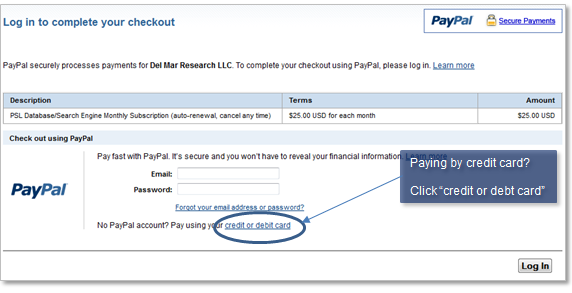
When you click on the ‘Subscribe Now’ button for a monthly subscription, a new secure PayPal window will open on your screen that looks similar to this image:
 Credit
Card*:
Credit
Card*:
You do
NOT have to create a “PayPal Account” to pay by credit card. Just click
on the words “credit or debit card” and a panel will open
where you enter your credit card information. That's all
there is to it. Your monthly subscription will start today.
PayPal Account*:
If you have a PayPal Account and want to use it to subscribe, just log into your PayPal Account
and follow the instructions.
* Please be aware that when you are posting a payment you are using a window to PayPal's website. If their system will not accept your credit card, or if you need additional help posting your payment, please use the 'Contact' link seen toward the bottom of PayPal's website at www.PayPal.com (PayPal has a team standing by waiting to help you post your payment).
Annual Subscription Payment Example
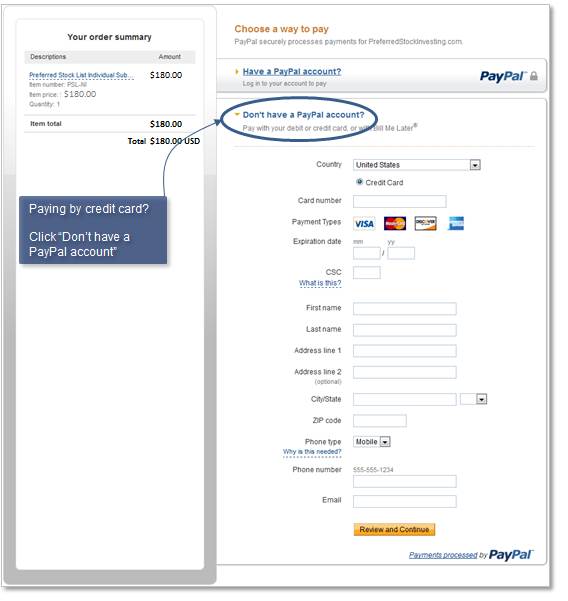
PayPal, the world’s largest credit card transaction processing company (over 1 million per day!), is our credit card processor. All credit cards are accepted or you may use your PayPal Account or send us a check. Posting a payment is secure, quick and easy! You do NOT need a 'PayPal Account' to pay by credit card.When you click on the ‘Subscribe Now’ button a new secure PayPal window will open on your screen that looks similar to this image:
 Credit
Card*:
Credit
Card*:
You do
NOT have to create a “PayPal Account” to pay by credit card. Just click
on the words “Don’t have a PayPal account” and a panel will open
where you enter your credit card information (shown here). That's all
there is to it.
PayPal Account*:
If you
have a PayPal Account and want to use it to subscribe, just click on the
"Have a PayPal account" link and sign into your PayPal Account.
Pay by check:
We
also accept checks! Just send an email to the following email address
requesting current instructions:
PayByCheck@PreferredStockInvesting.com
You will receive an immediate auto-reply email message (check your spam folder if you do not receive the auto-reply within a few minutes).
* Please be aware that when you are posting a payment you are using a window to PayPal's website. If their system will not accept your credit card, or if you need additional help posting your payment, please use the 'Contact Us' link seen toward the bottom of PayPal's website at www.PayPal.com (PayPal has a team standing by waiting to help you post your payment).